
Printing documents may seem simple at first glance, but small settings can make a big difference in the final output. One of the most commonly misunderstood options is collation. If you’ve ever wondered what does collate mean when printing, you’re not alone. Many users see the option in printer settings without fully understanding its purpose or benefits.
In this in-depth guide, we’ll explain what collating means in printing, how it works, when to use it, and why it matters. Whether you’re printing school assignments, office reports, or business documents, this article will help you make smarter printing decisions.
What Does Collate Mean When Printing?
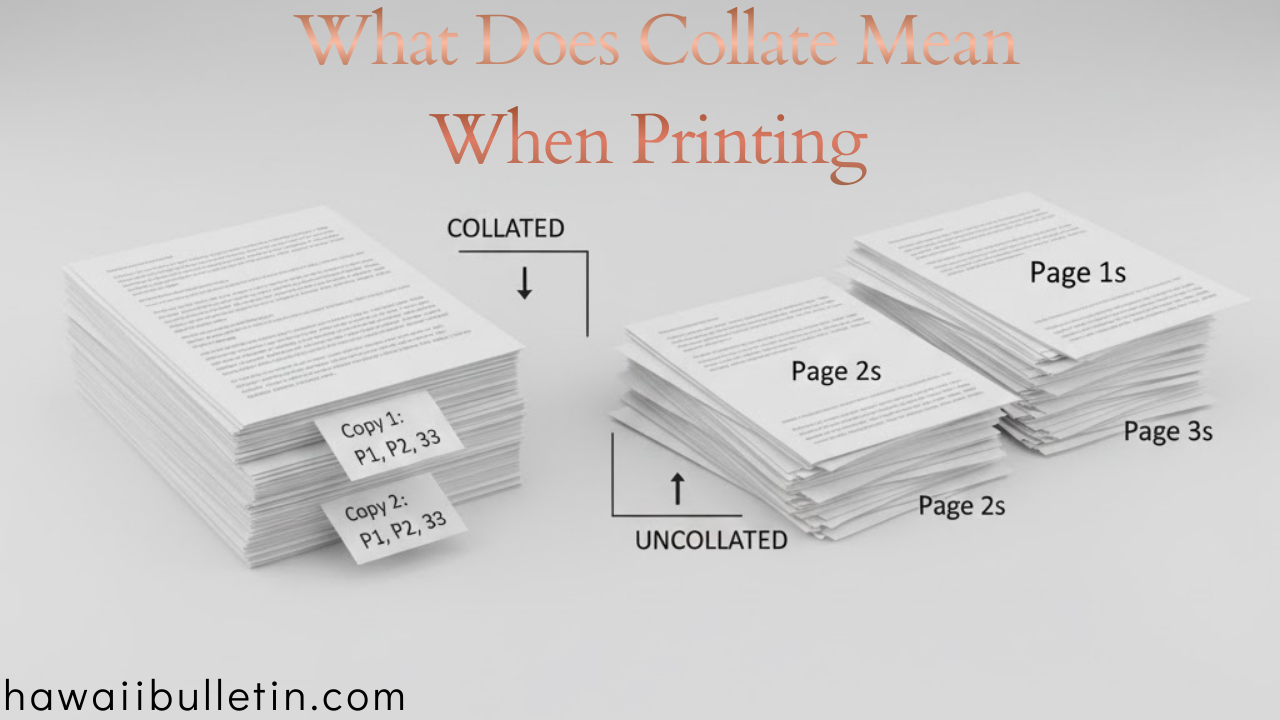
Collate in printing refers to the way pages are organized when multiple copies of a multi-page document are printed.
When you choose to collate, the printer arranges pages into complete, sequential sets. Without collation, the printer groups identical pages together instead.
Simple Example
Imagine printing a 3-page document with 2 copies:
-
Collated printing:
-
Copy 1: Page 1, Page 2, Page 3
-
Copy 2: Page 1, Page 2, Page 3
-
-
Uncollated printing:
-
Page 1, Page 1
-
Page 2, Page 2
-
Page 3, Page 3
-
This simple difference can save you significant time and effort, especially when handling large print jobs.
Why Is Collation Important in Printing?
Understanding what collate means when printing helps you avoid common mistakes and unnecessary manual work. Collation is particularly important when printing documents meant to be read, shared, or distributed.
Key Benefits of Collated Printing
-
Saves time by eliminating manual sorting
-
Ensures documents are in the correct order
-
Ideal for professional and academic use
-
Reduces printing errors in bulk jobs
-
Improves workflow efficiency
For offices, schools, and businesses, collated printing is more than a convenience—it’s a necessity.
Collated vs Uncollated Printing: What’s the Difference?
To fully understand printing collation, it’s important to compare both options side by side.
| Feature | Collated | Uncollated |
|---|---|---|
| Page Order | Complete sets | Grouped by page number |
| Best For | Reports, booklets, handouts | Flyers, single-page inserts |
| Manual Sorting | Not required | Required |
| Professional Use | Highly recommended | Limited use |
If your document has more than one page and you’re printing multiple copies, collated printing is almost always the better choice.
When Should You Use Collate When Printing?
While collation is useful in many situations, it’s not always necessary. Knowing when to use it can help optimize your printing process.
Use Collated Printing When:
-
Printing multi-page reports or manuals
-
Creating presentations for meetings
-
Printing assignments for students
-
Producing contracts or legal documents
-
Distributing brochures with multiple pages
Skip Collation When:
-
Printing single-page documents
-
Producing large batches of flyers
-
Printing identical inserts or forms
Understanding the context ensures you don’t waste time or resources.
How to Collate Documents When Printing
Most modern printers and operating systems make collating easy. The option is usually enabled by default, but it’s still important to double-check.
On Windows
-
Open the document
-
Press Ctrl + P
-
Open Printer Properties
-
Check the Collate option
-
Confirm and print
macOS
-
Open the document
-
Select Print
-
Go to Copies & Pages
-
Enable Collated
-
Print your document
On Printer Control Panels
Some high-end printers allow you to control collation directly from the device screen, which is useful for shared office printers.
What Does Collate Mean on a Printer Settings Menu?
When you see “Collate” in printer settings, it simply asks how you want your copies organized.
-
Checked / On = Pages printed as complete sets
-
Unchecked / Off = Pages printed in grouped order
This option is especially important when printing more than one copy of documents with multiple pages.
Common Printing Scenarios Explained
Let’s break down real-world examples to make collation even clearer.
Scenario 1: Printing Training Manuals
If each manual has 20 pages and you’re printing 10 copies, collated printing ensures each manual comes out ready to distribute—no sorting required.
Scenario 2: Printing Exam Papers
Teachers often print multiple copies of multi-page exams. Collation ensures every student receives a complete paper in the correct order.
Scenario 3: Printing Marketing Flyers
If your flyer is one page only, collating doesn’t matter. Uncollated printing works just as well and may even be faster.
Does Collated Printing Take Longer?
This is a common concern. The answer depends on your printer.
-
Modern printers: Minimal to no time difference
-
Older printers: Collation may slightly slow printing
-
Large documents: Time difference is usually negligible
In most cases, the time saved by avoiding manual sorting far outweighs any minor delay during printing.
Collate vs Staple vs Sort: Clearing the Confusion
Many people confuse collating with other finishing options.
Collate
-
Organizes pages into complete sets
Staple
-
Physically binds pages together
Sort
-
Often used interchangeably with collate on some printers
While collating organizes pages, stapling adds a physical finish. Both can be used together for professional results.
Frequently Asked Questions About Printing Collation
What does collate mean when printing multiple copies?
It means each copy is printed as a full document set, in the correct order.
Should I always collate when printing?
No. Collation is best for multi-page documents. For single-page prints, it’s unnecessary.
Is collated printing more expensive?
Not usually. It may use slightly more processing time, but ink and paper costs remain the same.
Why is my printer not collating correctly?
This could be due to:
-
Printer driver issues
-
Software overrides
-
Incorrect printer settings
Updating drivers often resolves the problem.
Tips for Efficient Printing and Collation
To get the best results every time, keep these tips in mind:
-
Preview your print layout before printing
-
Double-check the collate box
-
Test print one copy first
-
Use high-capacity trays for bulk jobs
-
Keep printer drivers updated
These small steps can prevent costly mistakes.
Why Understanding Collation Matters More Than You Think
Knowing what collate means when printing may seem minor, but it directly impacts productivity, professionalism, and efficiency. In offices and educational environments, incorrect collation can lead to confusion, wasted paper, and lost time.
By mastering this simple setting, you gain better control over your printing tasks and ensure your documents are always presentation-ready.
Final Thoughts: Print Smarter, Not Harder
Collated printing is a small setting with a big impact. Whether you’re a student, professional, or business owner, understanding how collation works helps you avoid errors and streamline your workflow.
Before your next print job, take a moment to check your collation settings—it could save you more time than you expect.