
 By Word Whimsy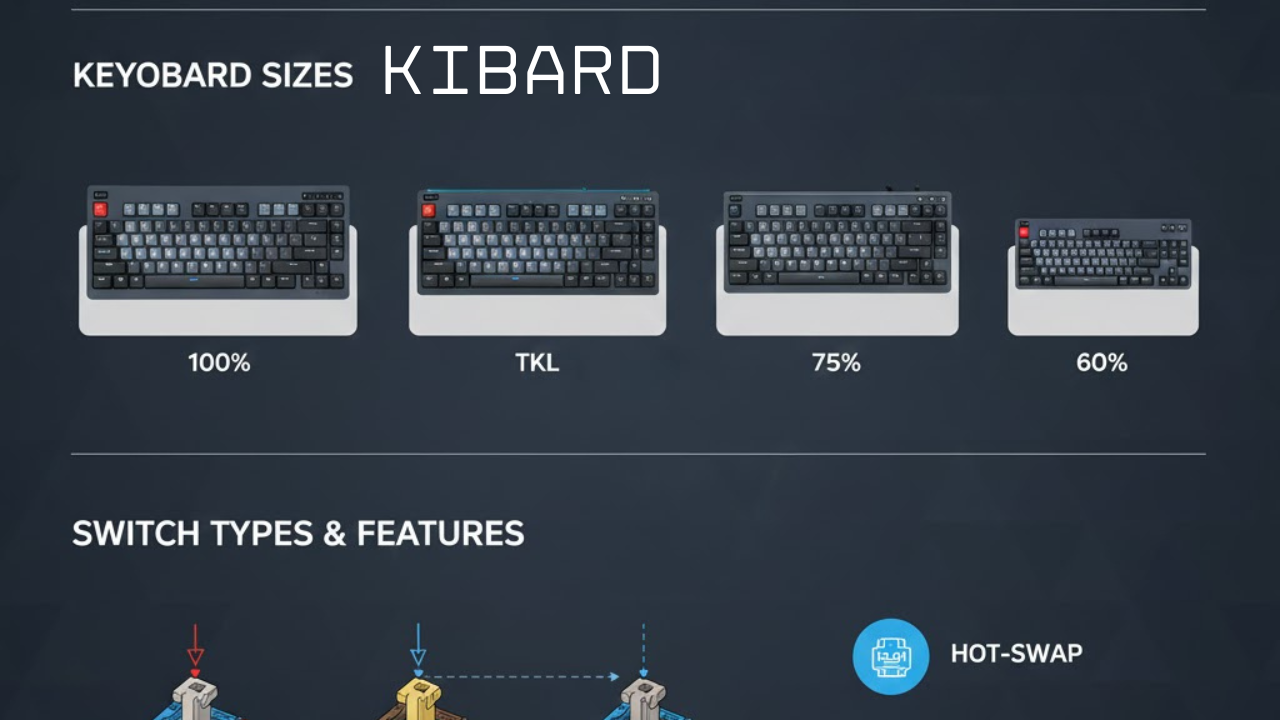
Kibard is more than just a tool; it’s the bridge between your intention and your digital action. Whether you’re gaming, coding, or writing, the right mechanical keyboard can dramatically enhance your comfort, speed, and enjoyment. This comprehensive guide will help you navigate the exciting and sometimes overwhelming world of mechanical keyboards in 2025, ensuring you find the perfect match for your fingers and your workflow.
Why Your Keyboard Choice Matters More Than You Think
Think about how much time you spend touching your keyboard. For many of us, it’s hours every single day. Yet, most people settle for the thin, mushy keyboard that came with their computer. Choosing a dedicated mechanical kibard isn’t just a luxury for enthusiasts; it’s an investment in your productivity, gaming performance, and long-term comfort. A high-quality keyboard provides tactile feedback that reduces errors, ergonomic designs that prevent strain, and a satisfying typing feel that makes every interaction more pleasant. The global market for gaming peripherals alone is booming, projected to reach over $11.5 billion by 2030, which shows how seriously people are taking their interface tools.
Mechanical vs. Membrane vs. Low-Profile: Decoding the Types
The first major decision is understanding the core technology. Let’s break down the three main categories:
-
Mechanical Keyboards: These are the heart of the kibard world. Each key has its own physical, individual switch underneath. This makes them highly durable (often rated for 50-100 million keystrokes), customizable, and incredibly responsive. They offer distinct tactile and audible feedback that many users prefer.
-
Membrane Keyboards: Common in most office and low-cost keyboards. They use a single rubbery membrane layer under all keys. Pressing a key pushes through the membrane to make contact. These are quieter and cheaper but often feel mushy, less precise, and have a shorter lifespan.
-
Low-Profile Keyboards: A subcategory that combines aspects of both. They use specially designed mechanical switches that are much shorter, resulting in a slimmer, sleeker keyboard—sometimes as thin as 11mm. They offer a more laptop-like typing experience while retaining some of the responsiveness of mechanical switches.
Finding Your Perfect Fit: Understanding Layouts and Sizes
Not all kibard designs are created equal. The size, or form factor, greatly impacts your desk space and functionality.
| Layout | Description | Best For |
|---|---|---|
| Full-Size (100%) | Includes the full alphanumeric section, number pad, function row, and navigation keys. | Accountants, data entry professionals, and anyone who uses the number pad frequently. |
| Tenkeyless (TKL or 80%) | Removes the number pad but keeps everything else. Saves significant desk space. | Most gamers and general users; allows more room for mouse movement. |
| 75% | Compacts the navigation keys into a cluster, removing some spacing but keeping most functionality. Extremely space-efficient. | Users who want arrow and function keys but have minimal desk space. |
| 60% | Removes the function row, number pad, and navigation cluster. Relies on keyboard layers for missing keys. | Minimalists, competitive gamers, and those who prioritize desk space above all. |
The Heart of the Feel: A Deep Dive into Keyboard Switches
The switch is the soul of your kibard. It determines the sound, tactile feel, and required actuation force. The three traditional types are based on the color-coding system pioneered by brands like Cherry MX, though many manufacturers now make their own variants.
-
Linear Switches (e.g., Red, Black): These offer a smooth, consistent keystroke from top to bottom with no tactile bump or audible click. They are favored by many gamers for fast, double-tapping actions and provide a quiet, fluid typing experience.
-
Tactile Switches (e.g., Brown, Clear): These provide a noticeable physical “bump” in the middle of the keystroke to signal that the key has been actuated. This feedback can improve typing accuracy and is a popular middle-ground for those who both type and game.
-
Clicky Switches (e.g., Blue, Green): These deliver both a strong tactile bump and a loud, audible “click” sound at the actuation point. They offer the most pronounced feedback but are often too loud for shared office spaces.
The Cutting Edge: Hall Effect and Optical Switches
2025 has seen the rise of advanced switch technologies that offer game-changing features.
-
Hall Effect Switches: Use magnetic fields to detect keystrokes, allowing for adjustable actuation points. You can digitally set how far down a key needs to travel to register (e.g., from a super-sensitive 0.1mm to a deliberate 4.0mm).
-
Optical Switches: Use beams of light to register key presses, leading to theoretically faster response times and incredible durability, as there’s no physical contact to wear out.
The Game-Changer: Rapid Trigger
This is arguably the most significant innovation in gaming kibard technology. Enabled by advanced switches like Hall Effect, Rapid Trigger resets a key the moment it starts moving back up, not when it reaches its resting position. This allows for incredibly fast repeated keystrokes, giving players a tangible advantage in fast-paced games.
Beyond the Basics: Key Features for Your 2025 Kibard
Modern mechanical keyboards come packed with features that enhance the experience:
-
Hot-Swap Sockets: A must-have for enthusiasts. These allow you to pull out switches and plug in new ones without any soldering, making customization and experimentation easy.
-
Build Quality: Look for a rigid frame, often made of aluminum, to prevent flex and provide a premium feel. Many high-end boards also feature gasket-mount designs, where the internal plate is suspended on soft gaskets for a more cushioned, pleasant typing sound and feel.
-
Connectivity: The wireless performance gap has virtually closed. Technologies like Logitech’s LIGHTSPEED and Corsair’s Slipstream offer ultra-low latency that rivals wired connections, providing clean desk convenience without compromise.
-
Software & Customization: Robust companion software (like Razer Synapse or Corsair iCUE) lets you remap every key, create complex macros, and synchronize dazzling RGB lighting across your setup.
Top Kibard Contenders: Standout Models of 2025
Based on rigorous testing for performance, build quality, and value, here are some of the top keyboards defining the market in 2025:
-
Wooting 80HE: Often hailed as the best for a competitive edge, thanks to its best-in-class Hall Effect switches and Rapid Trigger implementation.
-
Razer Huntsman V3 Pro: A top-tier choice for optical speed, featuring Gen-2 Analog Optical Switches with adjustable actuation and 8000Hz polling for near-zero latency.
-
Keychron Q1 Max: Beloved in the enthusiast community for offering a premium gasket-mount typing experience, full aluminum construction, and wireless connectivity in a single package.
-
Corsair K100 Air Wireless: The king of low-profile luxury, incredibly slim but packed with features and reliable wireless performance.
-
HyperX Alloy Origins Core: The best-value champion, delivering a solid aircraft-grade aluminum build and reliable performance at a more accessible price point.
Matching a Kibard to Your Digital Life
Your ideal keyboard should fit your primary use case:
-
The Competitive Gamer: Prioritize low latency (high polling rates like 8000Hz), Rapid Trigger technology, and a TKL or 75% layout for mouse space. The Wooting 80HE or Razer Huntsman V3 Pro are archetypes.
-
The Creator & Typist: Focus on typing feel and sound. Look for tactile switches, a gasket-mount design for acoustics, and a full-size or TKL layout. The Keychron Q1 Max is an excellent starting point.
-
The Minimalist & Professional: Seek a clean, sleek design, quiet switches (linear or tactile), and wireless connectivity. A low-profile board like the Corsair K100 Air or a subtle 75% layout works perfectly.
-
The Enthusiast & Customizer: Hot-swap sockets are non-negotiable. Focus on boards with a strong modding community, good internal construction (like foam padding), and support for open-source software like VIA/QMK for limitless customization.
Final Keys to Your Decision
Choosing your kibard is a personal journey. Start by identifying your core needs: gaming, typing, or a mix. Decide on a size that fits your desk and workflow. Then, dive into the world of switches—consider buying a switch tester to feel the difference firsthand. Finally, set a budget that reflects how important this daily tool is to you.
The perfect keyboard doesn’t just perform a function; it inspires and delights with every press. In 2025, with innovations like adjustable actuation and Rapid Trigger, your keyboard is no longer just an input device—it’s a piece of technology you can fine-tune to be a perfect extension of yourself.