
 By Word Whimsy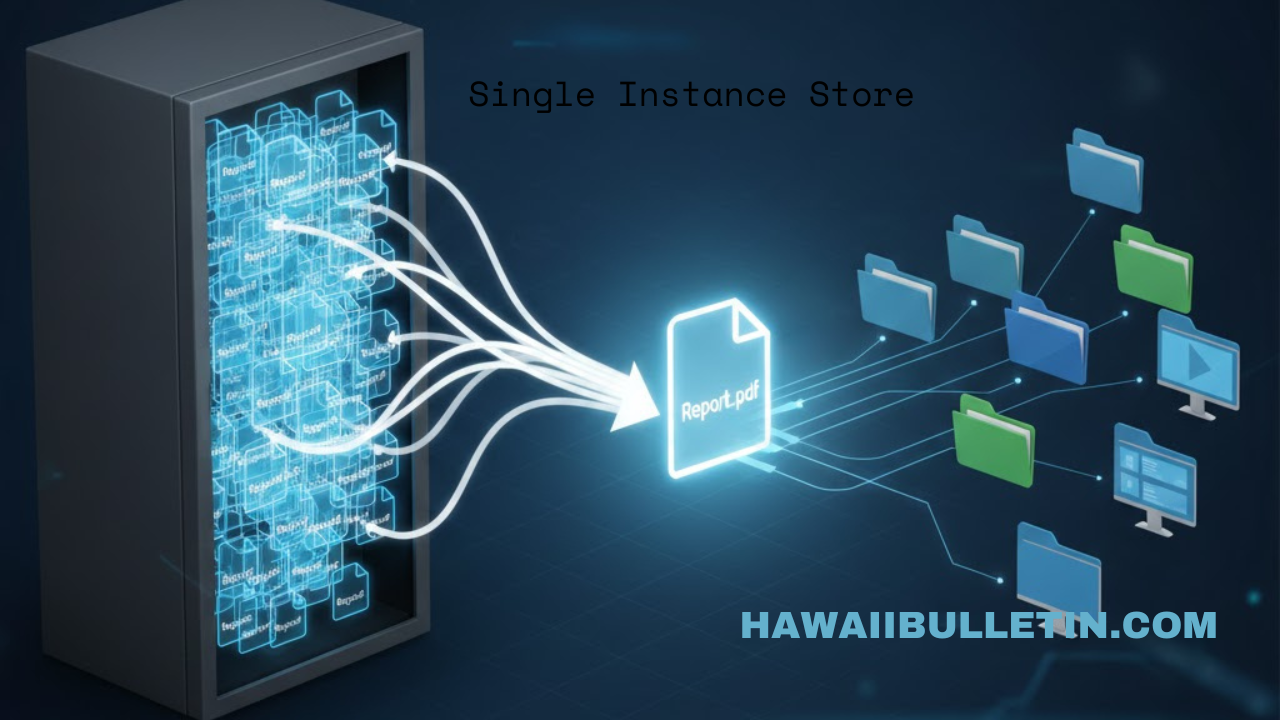
Introduction: The Hidden Cost of Digital Clutter
In our data-saturated world, duplicate files are the silent resource drain. Imagine an email with a large attachment sent to 100 colleagues—without optimization, this creates 101 identical copies consuming storage space. This scenario plays out millions of times daily across email systems, backup servers, and cloud platforms. Single Instance Store (SIS) is the intelligent architectural solution designed to solve this exact problem. By ensuring that only one unique copy of any piece of data is physically stored, SIS dramatically reduces waste, lowers costs, and simplifies data management. This article explores how this powerful technology works, where it’s used, and why it’s essential for modern, efficient IT infrastructure.
What is Single Instance Store?
At its core, Single Instance Store (SIS) is a storage system’s ability to identify multiple identical copies of data and replace them with a single, shared instance. It’s a form of data deduplication, but one that typically operates at the whole-file or whole-object level. When the system encounters a new file, it checks whether an identical copy already exists in its repository.
If a match is found, the system does not store a second physical copy. Instead, it creates a reference pointer or link that directs the user or application to the original stored instance. To the end-user, nothing changes—files appear in their expected locations with the correct names and permissions. Behind the scenes, however, the storage footprint has been streamlined.
This mechanism is distinct from more granular, block-level deduplication, which can find redundancies within files. SIS is about eliminating entire duplicate files, making it exceptionally effective for environments with many copies of the same data, like standard operating system files installed across hundreds of computers or common document templates shared company-wide.
How Does Single Instance Storage Work? A Technical Look
The magic of a single instance store happens through a series of automated, behind-the-scenes processes. Here’s a step-by-step breakdown of the typical workflow:
-
. Crucially, this fingerprint is based solely on the data itself, not the file’s name, location, or creation date.
-
Index Comparison: The system checks this unique hash against an index of all hashes from previously stored files.
-
Action Decision:
-
If the hash is NEW, the file is unique. The system stores the full file content in a central repository, often called the SIS Common Store, and adds its hash to the index.
-
If the hash EXISTS, the file is a duplicate. The system stores only minimal metadata (like the file name and path) and creates a hard link or pointer to the single physical copy in the Common Store.
-
-
Transparent Access: When any user needs to access the file, the system uses the pointer to retrieve the single instance from the Common Store, presenting it seamlessly as if it were a local file.
A key application of this is in incremental backup systems. Traditional backups might copy unchanged files repeatedly This allows each backup point to appear as a full snapshot while consuming space only for changed data.
Key Benefits of Implementing a Single Instance Store
Adopting an SIS strategy delivers tangible advantages that impact cost, performance, and management.
| Benefit Area | Specific Impact |
|---|---|
| Storage Efficiency | Can reduce storage needs by 80% or more in scenarios with high duplication, like email servers or virtual desktop images. |
| Cost Reduction | Directly lowers expenses for physical hardware, cloud storage subscriptions, and associated power and cooling. |
| Enhanced Backup Performance | Makes backup windows shorter and recovery objectives (RTO) easier to meet due to smaller data volumes. |
| Simplified Data Management | Centralizes data, reducing errors from version conflicts and making compliance, eDiscovery, and audits more straightforward. |
| Improved Network Performance | For distributed systems, transmitting a pointer instead of a multi-megabyte file saves significant bandwidth. |
Real-World Applications and Use Cases
Single instance storage isn’t a theoretical concept; it’s a proven technology embedded in systems many of us use daily.
-
Email Servers and Archiving: This is a classic SIS application. When an email with a 10MB attachment is sent to a 100-person distribution list, a traditional system might store 100 copies. An SIS-enabled email server stores one copy and creates 100 pointers, leading to massive storage savings and more efficient message delivery. Dedicated email archiving solutions leverage SIS to compress corporate mailboxes.
-
Backup and Disaster Recovery Solutions: Modern backup software uses SIS principles to avoid repeatedly backing up unchanged files. This is critical for maintaining long backup histories without requiring exponentially growing storage space.
-
Cloud Storage Platforms: While cloud object storage often uses finer-grained deduplication, the core SIS principle of “store once, reference many” is fundamental to its economics, especially for shared documents in collaborative environments.
-
Virtual Desktop Infrastructure (VDI): In VDI, dozens or hundreds of virtual desktops may boot from the same master operating system image. SIS ensures only one instance of that core image is stored, with each virtual desktop linking to it, dramatically reducing storage costs for the deployment.
-
Content Delivery and File Sharing: Corporate file shares and document management systems benefit from SIS when multiple users save copies of the same standard templates, policies, or software installers.
SIS vs. Traditional Storage: A Clear Comparison
To understand the value proposition, it’s helpful to contrast SIS with a traditional storage approach.
| Aspect | Traditional Storage | Single Instance Store |
| :— | :— | :— | :— |
| Philosophy | Stores every copy of data, regardless of duplicates. | Stores only unique data; replaces duplicates with pointers. |
| Storage Utilization | Often inefficient, with high levels of redundancy. | Highly optimized, minimizing physical storage needs. |
| Cost at Scale | Costs grow linearly (or worse) with data and users. | Costs are contained due to deduplication efficiency. |
| Backup Size & Speed | Backups become larger and slower over time. | Backups remain lean and fast, as unchanged data is not recopied. |
| Primary Advantage | Simplicity of concept. | Intelligent efficiency and resource optimization. |
The Evolution and Future of Deduplication
Microsoft was an early mainstream adopter, implementing SIS in features like Remote Installation Services (RIS) in Windows 2000 and within Exchange Server for attachments. However, they later deprecated the file-based SIS feature in Windows Server in favor of more advanced, chunk-based data deduplication that can find redundancies within files, not just between whole files.
The future points toward AI-enhanced storage management, where systems might predictively deduplicate data, optimize placement based on usage, and further automate storage lifecycle policies. The goal remains constant: to store data intelligently, making infrastructure sustainable, cost-effective, and performant as data volumes continue their explosive growth.
Conclusion: Embracing Intelligent Storage
Single Instance Store is more than a technical feature; it’s a philosophy of intelligent resource management. In an era where data is a critical asset but also a significant cost center, technologies that eliminate waste without compromising access are indispensable. From shrinking backup windows to enabling scalable virtual desktop deployments, SIS provides a foundational efficiency that powers modern IT.
 Saman Zahra